
Text editor · Linux · macOS · Windows

    A workspace that keeps everything — saved or not.

    Every tab and every edit is still there tomorrow, whether you saved it or not. No "save before closing?" prompts, no recovery dialogs — your work simply stays until you decide otherwise.

    Download for freeWhat's comingFree: the complete editor · Pro: adds local AI
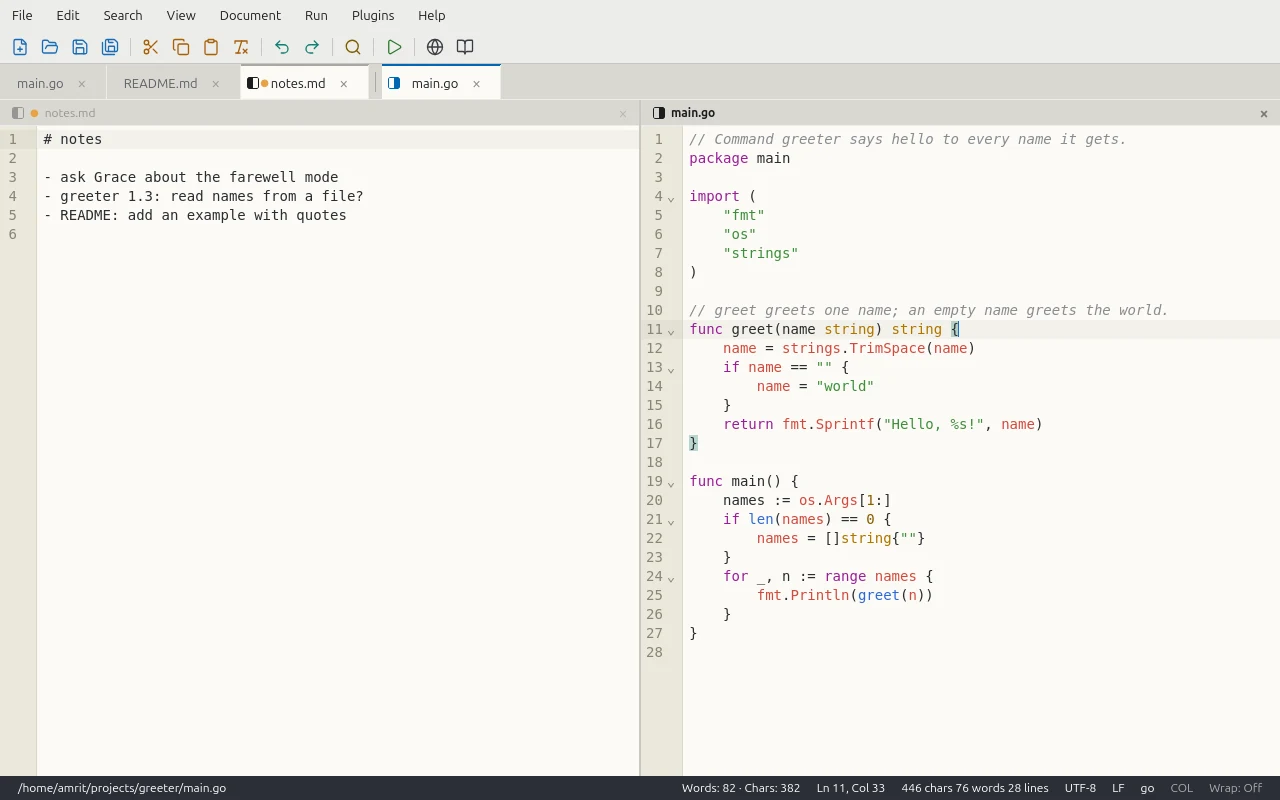
    Edithor 0.12 with an unsaved note and a Go file side by side in split view
    Edithor 0.12 with greeter, a small sample project: an unsaved note next to main.go in split view. The orange dot marks unsaved changes — they are kept anyway.
    log file opens in about a second
    4 GB
    languages with syntax highlighting
    28+
    encodings in Encode / Decode
    13
    platforms: Linux, macOS and Windows
    3

    The Notepad++ way

    Three promises behind every tab.

    1. 01

      Nothing is ever lost

      Every tab and every edit is kept across restarts — saved or not. Jot something into a new tab without a file name; it is still there tomorrow.

    2. 02

      Saves automatically, if you like

      Ctrl+S writes to the file whenever you want. Or switch on auto-save and Edithor writes your files at an interval you choose. Either way, your work is already safe.

    3. 03

      You decide what goes

      Text only goes away when you close its tab on purpose — and even then Ctrl+Shift+T brings it back during the session. Closing a tab never touches your saved files on disk.

    Personal note

    Why Edithor exists

    As a senior software engineer, I have worked professionally in IT for more than 25 years. One of my most important tools has always been an editor that takes out formatting and images. Plain text, nothing else. I even built a dedicated button for that into Edithor.

    On Windows, plain Notepad did the job at first; later Notepad++ became my constant companion. But as an IT professional I want to — and have to — work with every system: Linux, macOS and Windows. A different editor on each system, vi among them. And they all had their quirks; on Linux there was no real equivalent to Notepad++.

    So now, with the help of AI, I have built the editor I always wanted. It runs on all three operating systems and has every function that someone in IT like me needs again and again — from automatic saving and file-less tabs to generating QR codes. And I work with it every day.

    Whenever I need to copy something, from an AI chatbot or a website, it all goes into the editor and stays there as long as I need it. No blockers on closing like “File X has not been saved”, but a constant workspace that still holds all those quickly copied notes the next day.

    Of course everyone needs something different, so extensions can be written, with simple plugin management.

    The name is just as plain: a single “h” added, as a nod to the Norse gods.

    The essential part has stayed free. Only the special things belong to the Pro version: AI and, coming soon, security features such as encryption per tab and temporary, sensitive data kept only in memory.
    Oliver Glas

    Senior Software Engineer

    Never lose work

    The editor keeps your work. You decide what to throw away.

    Every safety net is built in, not bolted on. You never need a recovery dialog, because nothing was lost in the first place.

    Restore after close
    Closed a tab with unsaved changes? Restore brings it back. Ctrl+Shift+T reopens any tab closed in this session.
    Deleted on disk, still open
    A file deleted outside the editor stays open, marked missing on disk, so you can save it again. For files up to 2 MB Edithor also keeps a safety copy, which covers a deletion while Edithor is closed.
    Unsaved changes, clearly marked
    Edits you have not saved yet are kept across restarts and marked on the tab. The mark disappears by itself when the text matches the file again.
    Named notes
    Give an untitled tab a name. It becomes the file name proposed by Save As and picks the syntax highlighting.
    Layout comes back
    Split view, cursor positions, window size and position are restored on start.
    One-file backup
    Export every tab plus your settings into one .edithor.bak file, and import it on another machine.

    Just the text

    Edithor distils documents to what you actually need: the text.

    Whether it's a PDF, a web page or copied text: no fonts, no layout, no scripts — just words you can search, copy and edit.

    • PDF → text

      Open a PDF and get its text in a new tab, with page markers. Search in Files finds words inside PDFs, too.

    • Web page → text

      The bundled Browser plugin shows web pages as readable text, with scripts off by default; links are kept as references. On the command line: edithor webtext.

    • New in 0.12

      Copied text → plain text

      Strip Formatting removes fonts, colours and styles from what you copied. Tables from a web page become rows you can paste into a spreadsheet.

    • Rough text → clean paragraphs

      Format Plain Text wraps lines, reflows paragraphs, separates sentences and cleans up whitespace.

    Example: a user guide as PDF

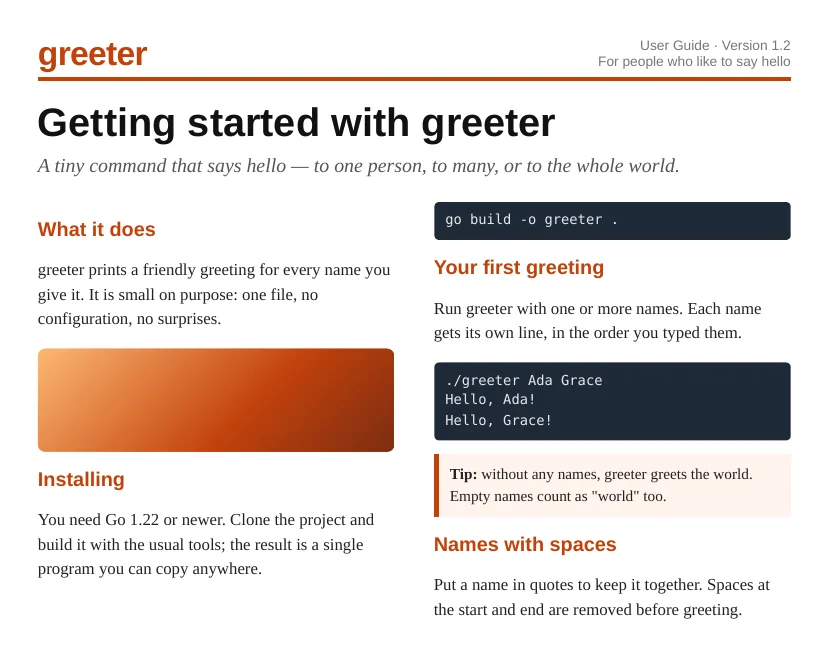
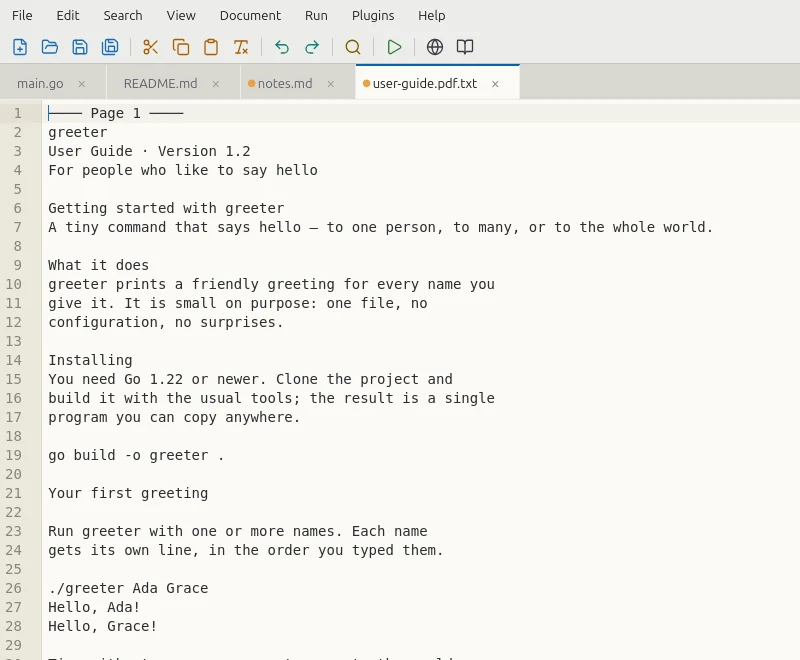
    A PDF guide as the example (for an imaginary “greeter” app), on the right in Edithor.

    PDF sample
    Page of a sample PDF user guide with columns, coloured headings and boxes
    Text from the PDF in Edithor
    The same user guide opened in Edithor as plain text, with a page marker

    Features

    Built for code, comfortable for prose.

    28+ languages

    CodeMirror 6 with language detection, changeable per tab. Go, Rust, Python, TypeScript, Markdown — and the rest.

    Split view

    Vertical or horizontal. Move or clone a tab to the other side — refer or compare without losing context.

    Edit over SSH

    Open ssh:// addresses on Linux and macOS. Sign-in with your SSH keys or ssh-agent, known-hosts check, atomic saves, and Keep mine / Take remote / View diff when the file changed meanwhile.

    Command palette

    Every command is one quick search away, even with a typo. Column selection, bookmarks, line operations, snippets — and an optional Vim mode.

    Search in Files

    Search a whole folder at once, quickly and with each file's encoding respected — PDFs included.

    Large files

    Files over 50 MB open in a fast viewer made for reading and searching, with search across the whole file. A 4 GB log opens in about a second.

    Encodings and line ends

    Detects UTF-8, UTF-16/32 and legacy charsets. Reload as, convert to, interpret as. CRLF, LF or CR; tabs or spaces.

    Format code and data

    Format Document tidies code and data with Prettier, in one step.

    Your look

    Built-in dark and light themes, plus your own themes as validated JSON files. Minimap, indent guides, whitespace display, zoom.

    Text tools

    The small jobs you used to open a website for.

    Right in the editor, offline: nothing you paste leaves your computer.

    • New in 0.12

      Encode / Decode

      Base64, Base64URL, hex, URL, HTML entities, JSON strings, Unicode escapes, Quoted-Printable, gzip+Base64, Punycode, Base32, ROT13 — with Auto-Detect and a preview before you apply.

    • New in 0.12

      Checksums

      CRC32, MD5, SHA-1, SHA-256, SHA-512, SHA3-256 and BLAKE3, HMAC, and a check against an expected hash.

    • QR codes

      Turn the selection into a QR code, saved as PNG or SVG.

    • Run commands

      Run shell commands and see their output; keep the ones you need in the menu.

    Command line

    The same engine, without a window.

    edithor opens files and folders in the running editor. The same code also runs as jobs in the terminal: format, show, detect, convert, lines, grep, qr, webtext. Read from standard input with -, hand the result to the editor with --with-ui.

    formatshowdetectconvertlinesgrepqrwebtext

    Coming in 0.14: a separate command-line tool called etc, also available as a package without the editor — for servers.

    ~ — bash
    $ edithor notes.md ~/projects/site # opens in the running editor
    $ edithor format config.json
    $ edithor detect legacy.csv
    $ journalctl -b | edithor show - --with-ui # result as a new tab
    $

    Safety & privacy

    Plugins you can trust by design.

    Every plugin runs in its own Web Worker with an explicit list of permissions. A plugin without the network permission cannot reach the internet, whatever its code tries.

    Bundled plugins: a Browser that shows web pages as text, Markdown preview and Word Count.

    1. 01One Web Worker per plugin. No shared globals, no surprise mutations to the editor. You see what a plugin asks for and grant folders one by one.
    2. 02Filesystem access is confined to the plugin's own data directory and the folders you grant. ~/.ssh, ~/.bashrc, the rest of your home — off-limits.
    3. 03Plugin network calls go through a controlled channel with SSRF protection, a rate limit and an audit log. The editor's interface itself makes no network connections.
    4. 04Files are written atomically (temporary file, then rename) — locally and over SFTP. Even a power cut never leaves half a file behind.
    5. 05The update check sends nothing about you and verifies a signed manifest. It tells you about a new version; you decide when to install it.

    Edithor Pro

    Local AI that reads with you — and stays on your machine.

    Pro is the complete free editor plus an AI assistant. It runs locally by default: your text does not leave your computer. Linux only for now.

    Buy in the shop
    • Summarise

      Summaries of long documents, split and merged so that even large files fit.

    • Explain Selection

      Mark a passage, a stack trace or a config block and ask what it means.

    • Ask About This Document

      Questions about the open tab, answered in the assistant panel, streamed and cancellable.

    • Your choice of engine

      Built-in llama.cpp inference, or a local or remote Ollama. About Local AI recommends a model for your hardware.

    Next for Pro: special tabs — memory-only tabs that are never written to disk, and encrypted tabs protected by a password.

    Roadmap

    Where Edithor is going.

    Free comes first, then Pro. Every release ships both editions.

    Public releases have even numbers. The odd numbers in between are internal test builds; their work arrives with the next public release.

    Dates and version numbers are planning targets, not promises.

    1. 0.12Delivered

      Text tools

      Free

      Encode / Decode, checksums and the clipboard cleaner — in the right-click menu and the command palette.

    2. 0.14December 2026Next

      Two programs: edithor and etc

      Free

      A separate command-line tool for scripts and servers, also as a package without the editor.

      Tools and command templates

      Free

      Run commands with templates and a live preview, without a shell by default. Plugins can bring tools; plugins install from a .zip and update in place.

    3. 0.16January 2027

      Pro foundation

      Pro

      Licence check that works offline, Pro updates through the same apt repository, "Edithor Pro" everywhere the app shows its name.

      Memory-only tabs

      Pro

      Special tabs for sensitive text: never written to disk, no history kept.

    4. 0.18February 2027

      Encrypted tabs

      Pro

      Tabs protected by a password (age encryption). Only you can open them: there is no master key, so keep your password safe.

      AI on the command line

      Pro

      Summarise, ask and explain from the terminal, with one model load for a whole batch of files.

    5. 1.0March 2027

      Security extras

      Pro

      Shred files, move text into a special tab, hide the window from screen capture.

      Stable release

      Everything above, fully tested and declared stable.

    Download

    Get Edithor.

    Freeware. Cross-platform. Builds for Linux (.deb), macOS (.dmg, universal), and Windows (.exe, NSIS) are produced from a single tag.

    Loading…