Getting Started
KeepUrAi is a private AI platform that runs entirely on your own servers. Your documents, your questions, and your generated content stay inside your network — nothing is sent to a third-party AI provider.
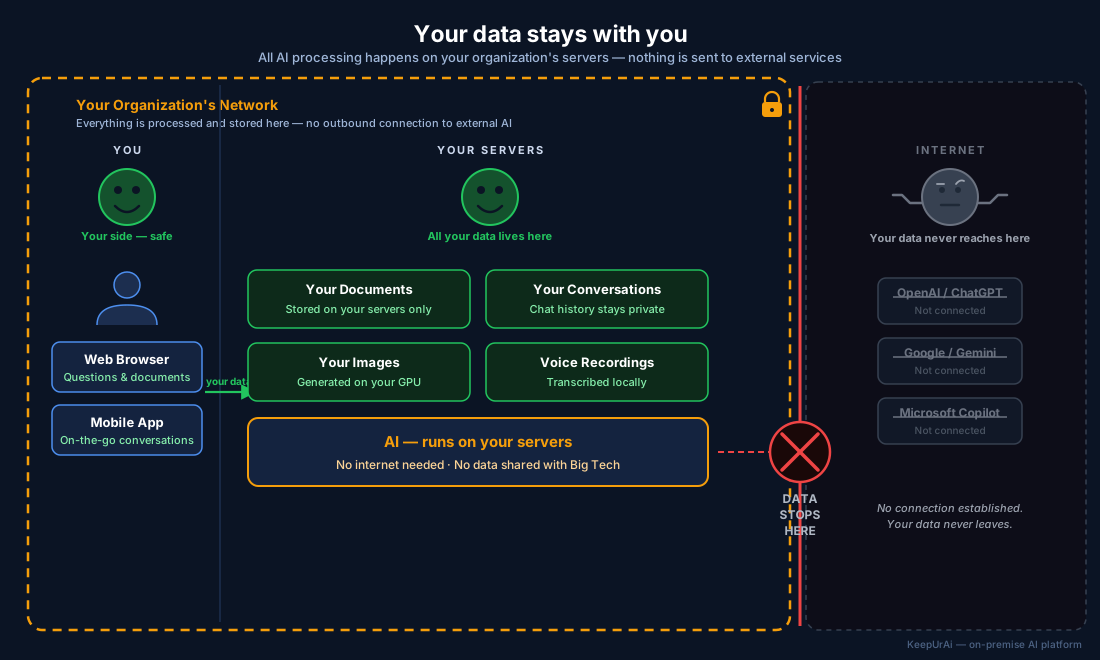
Your questions, documents, images, and conversations stay on your organization's servers. Nothing is sent to OpenAI, Google, or any external AI service.
What you can do with KeepUrAi
- Privacy first — air-gapped, on-premise, with role-based access control and full audit logging
- Ask — Question your documents in plain English and get answers grounded in their content
- Ask AI Developer — A coding-focused assistant for your engineers, without sending code outside your network
- Search Document — Keyword search across your uploaded files
- Translate — Translate text between dozens of languages, served by your own translation engine
- Data Administration — Curate which documents KeepUrAi sees for each query
- Image Generation — Create and extend images from text prompts on your own GPU
- Agent Tasks — Hand a task to an AI agent and come back when it's done
Navigation
The application uses tab-based navigation in the header. Click any tab to switch features. Conversation history and your settings automatically persist across browser sessions and devices when you are signed in.
Session Management
Each feature maintains its own session history:
- Conversations are saved to your account so they follow you between devices
- Browse previous sessions from the sidebar on the left
- Start a new session or continue an existing one at any time
- Rename or delete sessions whenever you like
Requirements
To use KeepUrAi, you need:
- A modern web browser (Chrome, Firefox, Safari, or Edge recommended)
- Network access to the KeepUrAi backend server
- For Image Generation: a running ComfyUI server instance on your network
- For Translate: a running LibreTranslate server (optional — Ollama provides a fallback)
- For Audio features: a running whisper.cpp server (optional)
Quick Start
- Navigate to the Ask tab
- Type a question about your uploaded documents
- Press Enter or click the submit button
- View the AI-generated response with relevant information from your documents
For detailed instructions on each feature, select a topic from the menu.
For developers and IT operators
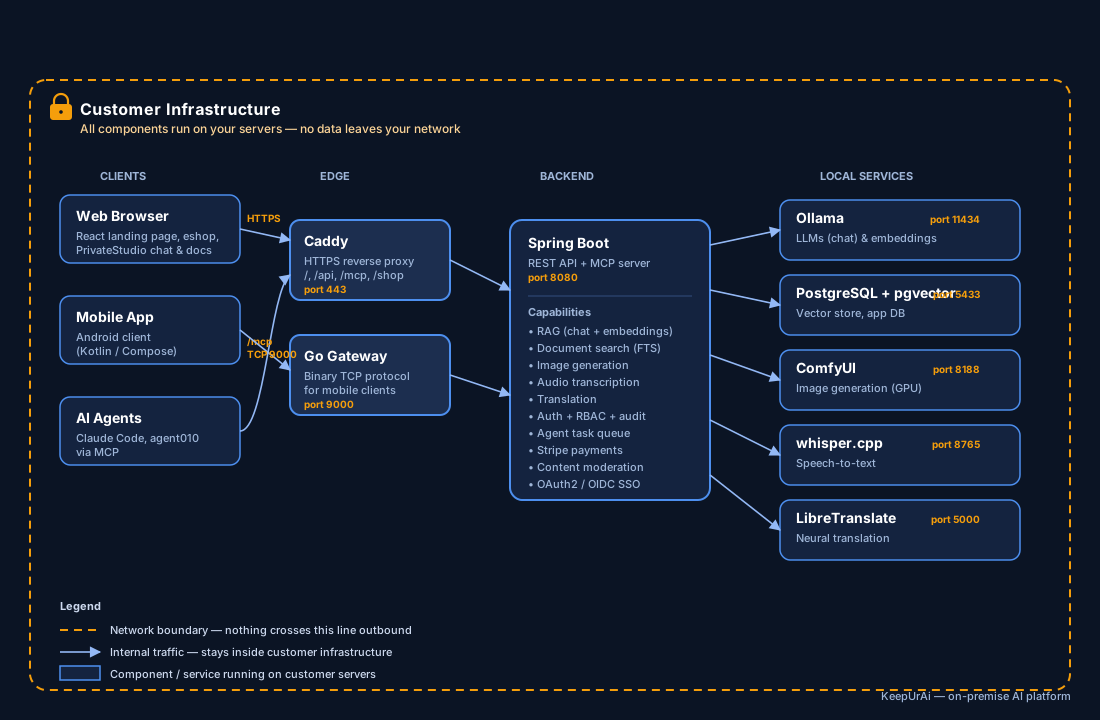
KeepUrAi ships a React 18 frontend and a Spring Boot backend. Document queries use RAG (Retrieval-Augmented Generation): text is embedded with the
nomic-embed-textmodel and stored in PostgreSQL with thepgvectorextension; chat completions are produced byllama3.2via Ollama. Image generation runs on a local ComfyUI server, audio transcription on whisper.cpp, and translation on LibreTranslate (with an Ollama fallback). All inference happens on your infrastructure — no traffic leaves the network boundary.
Full component and port map for infrastructure planning and deployment.