Ask
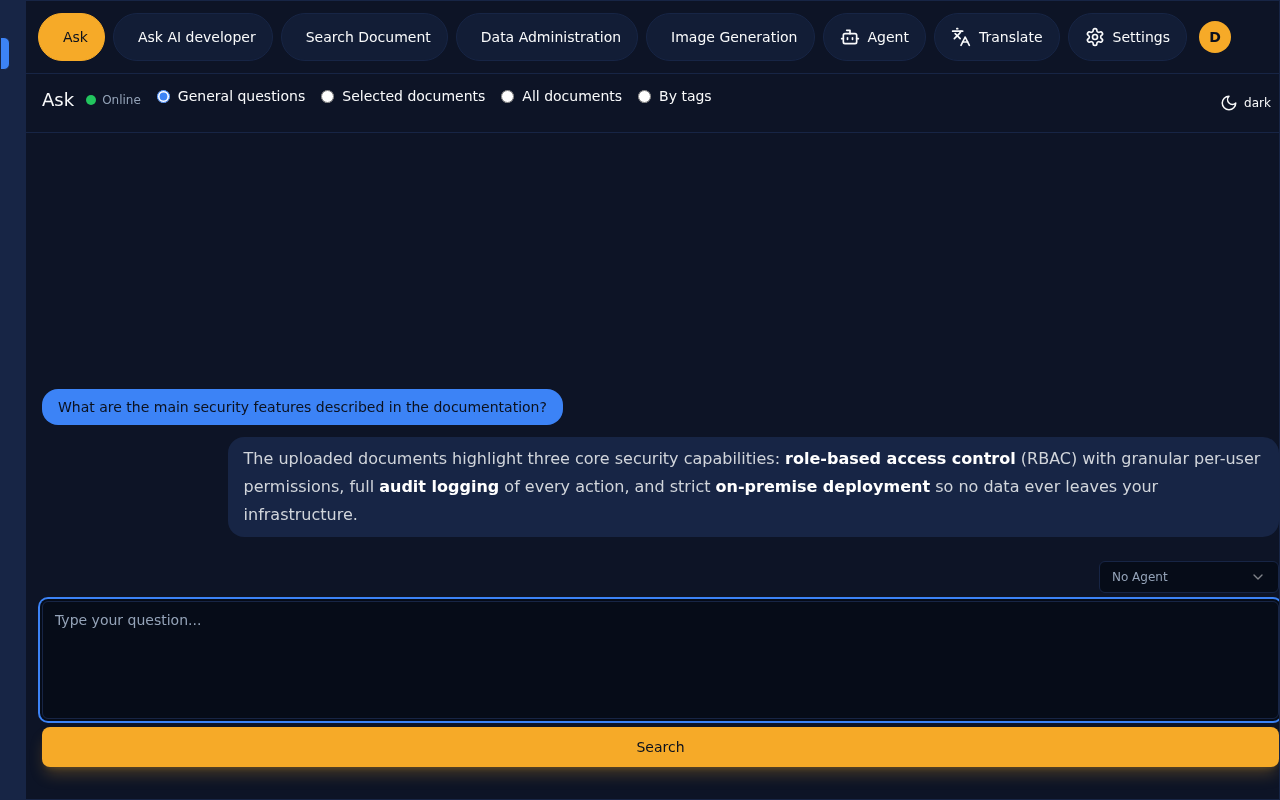
The Ask feature allows you to query your document library using natural language. The AI analyzes your documents and provides relevant answers based on their content.
How It Works
When you submit a question:
- Your query is converted into a vector representation
- The system searches for semantically similar content in your documents
- Relevant document sections are retrieved and provided as context
- The AI generates a response based on this context
This approach ensures answers are grounded in your actual documents rather than general knowledge.
Using the Ask Feature
Submitting a Question
- Click on the Ask tab in the navigation
- Type your question in the search input at the top
- Press Enter or click the submit button
- Wait for the AI to process and respond
Viewing Responses
Responses appear below your question with:
- Formatted text with proper headings and paragraphs
- Code blocks with syntax highlighting when applicable
- A typing animation as the response is displayed
Managing Sessions
The sidebar on the left displays your conversation history:
- Recent conversations are automatically grouped by date
- Click any session to view its contents or continue the conversation
- Use the + button at the top to start a new session
- Hover over any session to reveal edit and delete options
Document Filtering
You can control which documents the AI searches:
View Modes
In the header area, you can select a view mode:
- All documents — Search across your entire document library
- Custom documents — Search only documents you've selected in Data Administration
- None — Disable document context (AI responds from general knowledge only)
Setting Up Custom Filters
- Go to the Data Administration tab
- Select the documents you want to include
- Return to Ask and choose "Custom documents" view mode
- Your queries will now only search the selected documents
Tips for Better Results
- Be specific — Include relevant details in your question
- Use keywords — Mention specific terms that appear in your documents
- Ask follow-up questions — The AI maintains context within a session
- Try rephrasing — If the answer isn't helpful, try asking differently
Examples
| Question Type | Example | |--------------|---------| | Factual | "What are the security requirements mentioned in the compliance document?" | | Procedural | "How do I configure the API authentication?" | | Comparative | "What are the differences between the two deployment options?" | | Summary | "Summarize the key points from the project proposal." |
Technology: The Ask feature uses RAG (Retrieval-Augmented Generation) combining vector similarity search with LLM inference. Documents are chunked and embedded using the nomic-embed-text model and stored in PostgreSQL with the pgvector extension. Chat completions are produced by the llama3.2 model. Queries hit the /ask/doc endpoint with optional filter parameters for document selection.